

Bringing Back Unnest

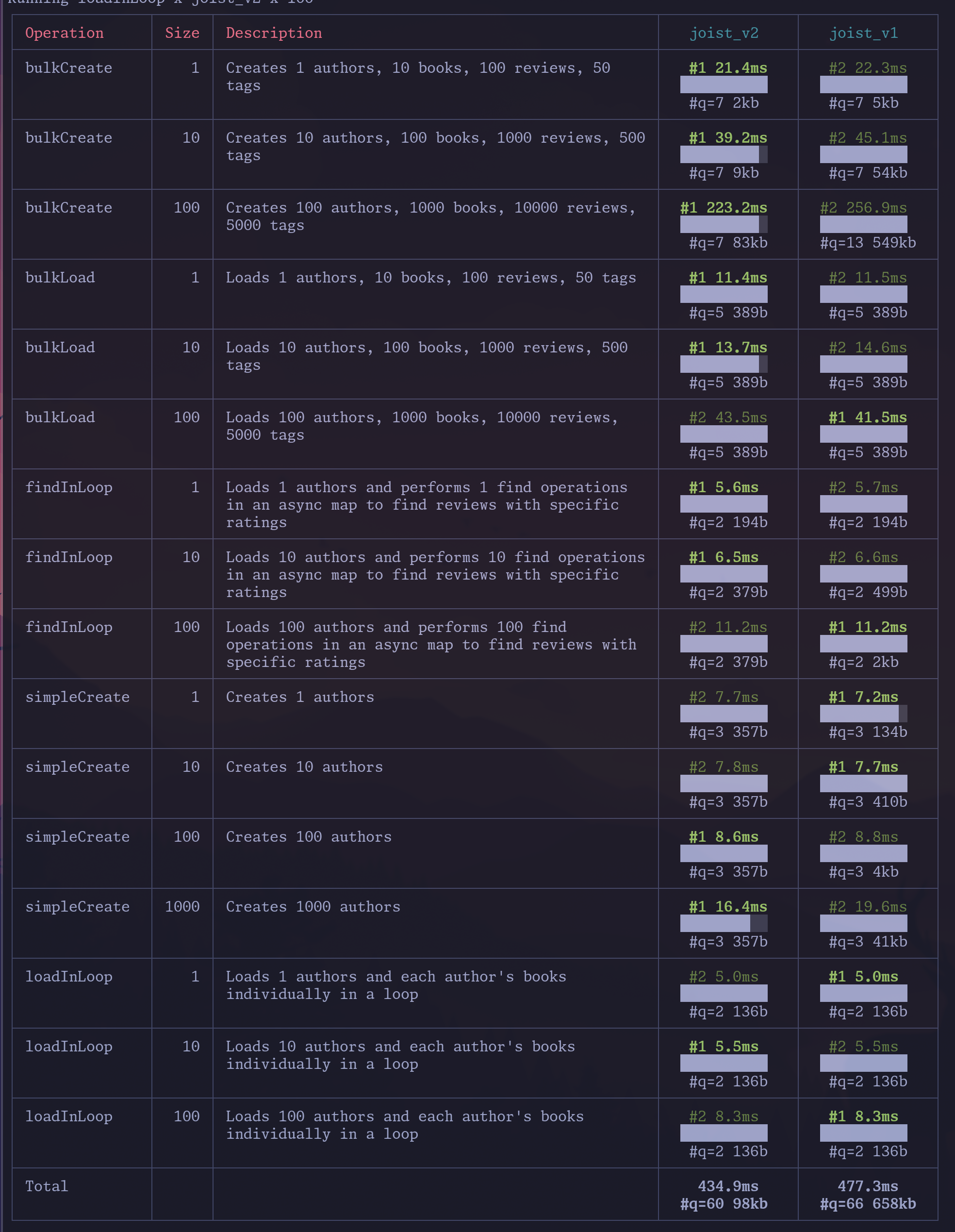
The latest Joist release brings back leveraging the Postgres unnest function (see the PR), for a nice 9% bump on our alpha latency-oriented benchmarks (joist_v2 is the merged PR):
What is unnest?
Section titled “What is unnest?”unnest is a Postgres function that takes an array and returns a set of rows, one for each element in the array.
The simplest example is converting one array and turning it into a set of rows:
-- Pass in 1 array, get back 3 rowsselect unnest(array[1, 2, 3]) as i; i--- 1 2 3(3 rows)But you can also use multiple unnest statements to get multiple columns on those rows:
select unnest(array[1, 2, 3]) as id, unnest(array['foo', 'bar', 'zaz']) as first_name; id | first_name----+------------ 1 | foo 2 | bar 3 | zaz(3 rows)Why unnest is useful
Section titled “Why unnest is useful”unnest is great for bulk SQL statements, such as inserting 10 authors in one INSERT; without INSERT you might have 4 columns * 10 authors = 40 query parameters:
INSERT INTO authors (first_name, last_name, publisher_id, favorite_color) VALUES (?, ?, ?, ?). -- #a1 (?, ?, ?, ?), -- #a2 (?, ?, ?, ?), -- #a3 (?, ?, ?, ?), -- #a4 (?, ?, ?, ?), -- #a5 (?, ?, ?, ?), -- #a6 (?, ?, ?, ?), -- #a7 (?, ?, ?, ?), -- #a8 (?, ?, ?, ?), -- #a9 (?, ?, ?, ?) -- #a10Where we have 10 first_name parameters, 10 last_name parameters, etc., but with unnest we can instead send up “just 1 array per column”:
INSERT INTO authors (first_name, last_name, publisher_id, favorite_color) SELECT * FROM unnest( $1::varchar[], -- first_names $2::varchar[], -- last_names $3::int[], -- publisher_ids $3::varchar[] -- colors )The benefits of fewer query parameters are:
- Smaller SQL statements going over the wire (one of our benchmarks saw 41kb of SQL without
unnest, and 350 bytes withunnest) - “Stable” SQL statement that don’t change for each “number of authors being updated”, so will have better prepared statement cache hit rates
- Observability tools like Datadog will also better group “stable” SQL statements with a fixed number of parameters
This is generally a well-known approach, i.e. TimeScale had a blog post highlighting a 2x performance increase, albeit you have to get to fairly large update sizes to have this much impact.
Bringing it back?
Section titled “Bringing it back?”Joist had previously used unnest in our INSERTs and UPDATEs, but we’d removed it because it turns out unnest is finicky with array columns—it “overflattens” and requires reactangular arrays.
(I.e. array columns like varchar[] for storing multiple values favorite_colors = ['red', 'blue'] in a single column.)
The 1st unfortunate thing with unnest is that it “overflattens”, i.e. if we want to update two author’s favorite_colors columns using unnest, we’d intuitively think “let’s just pass an array of arrays”, one array for each author:
-- Pass two arrays, with two elements each-- We expect to get back two rows of {red,blue} and {green,purple}select * from unnest(array[array['red','blue'],array['green','purple']]); unnest-------- red blue green purple(4 rows)…wait, we got 4 rows instead.
Unfortunately this is just how unnest works—when given 2-dimensional arrays (like a matrix), it creates a row per each value/cell in matrix.
Another unfortunate wrinkle with unnest is that our intuitive “array of arrays” creates fundamentally invalid arrays if the authors have a different number of favorite colors:
-- Try to create 1 array of {red,blue} and 1 array of {purple}select * from unnest(array[array['red','blue'],array['purple']]);-- ERROR: multidimensional arrays must have array expressions with matching dimensionsOur error is treating the varchar[][] as “an array of arrays”, when fundamentally Postgres treats it as “a single array, of two dimensions”, like mathematical n-dimensional arrays or matrices: they must be “rectangular” i.e. every row of our m x n matrix must be the same length (we’ve been trying to create “jagged” multidimensional arrays, which is not supported).
One final wrinkle is, not only must all rows be the same length, but think about nullable columns—how could we set a1 favorite_colors='red', 'blue'] but then set a2 favorite_colors=null? With unnests strict array limitations we cannot.
The combination of these issues is why we’d previously removed unnest usage, but now have introducing our own unnest_arrays custom function that solves each of these problems.
unnest_arrays Custom Function
Section titled “unnest_arrays Custom Function”Our custom unnest_arrays function works around unnests limitations by coordinating with the Joist runtime to create 2-dimensional arrays that satisfy Postgres’s requirements, but still produce the desired values:
- When updating
favorite_colorsfor multiple authors with different number of colors, we pad trailingnulls to the end of each author’s colors array, until the array is rectangular - When updating
favorite_colorsto null, we also pad a single leadingnullto indicate the desired nullness (and pad a “not-null marker” for other rows).
This is simpler to see with an example, of updating three authors:
- Author 1 should update
favorite_colors=red,green,blue - Author 2 should update
favorite_colors=green - Author 3 should update
favorite_colors=null
We are able to issue a SQL UPDATE like:
WITH data AS ( SELECT unnest($1) as id unnest_arrays($2) as favorite_colors,)UPDATE authors SET favorite_colors = data.favorite_colorsFROM data WHERE authors.id = data.idAnd our favorite_colors array looks like:
-- Created by the Joist runtime by reading the Author's favoriteColors-- property and then adding padding as needed to a rectangular 2D arrayarray[ array['', 'red', 'green', 'blue'], -- a:1 array['', 'green', null, null], -- a:2 array[null, null, null, null]] -- a:3]This array is passed our unnest_arrays custom function that knows about each of these conventions:
CREATE OR REPLACE FUNCTION unnest_arrays(arr ANYARRAY, nullable BOOLEAN = false, OUT a ANYARRAY) RETURNS SETOF ANYARRAY LANGUAGE plpgsql IMMUTABLE STRICT AS$func$BEGIN FOREACH a SLICE 1 IN ARRAY arr LOOP -- When invoked for nullable columns, watch for the is-null/is-not-null marker IF nullable THEN -- If we should be null, drop all values and return null IF a[1] IS NULL THEN a := NULL; -- Otherwise drop the is-not-null marker ELSE a := a[2:array_length(a, 1)]; END IF; END IF; -- Drop all remaining/trailing nulls a := array_remove(a, NULL); RETURN NEXT; END LOOP;ENDAnd that’s it; we get out the other side our desired rows:
select unnest_arrays(array[  array['', 'red', 'green', 'blue'], -- a:1  array['', 'green', null, null], -- a:2  array[null, null, null, null]] -- a:3, true);  unnest_arrays------------------  {red,green,blue}  {green}
(3 rows)
Pros/Cons
Section titled “Pros/Cons”Our solution has a few pros/cons:
- Pro: We’ve restored our ability to use
unnestfor all of our batched SELECTs, UPDATEs, and INSERTs 🎉 - Con: Joist users with array columns in their schemas will need to create the
unnest_arraysfunction- This is a one-time migration so seems reasonable
- Con: With all the
nullpadding tricks, we’re giving up the ability to have null values within our array values- I.e. we cannot have
favorite_colors=[red, null, blue] - For our domain modeling purposes, this is a fine/acceptable tradeoff, b/c we’ve always modeled
varchar[]columns asstring[]and notArray<string | null>— we actively don’t wantnulls in ourvarchar[]columns anyway
- I.e. we cannot have
So far these pros/cons are worth it 🚀; but, as always, we’ll continue adjusting our approach as we learn more from real-world use cases & usage.